HELLO EVERYONE !
Unfortunately this is my last post for this semester ! This was a strange year for all of us. We stayed at home because of corona but we kept producing and learning thanks to Material design course and our teacher. With corona , I realized how much technology important for teachers. We kept doing our classes online and it showed that teachers don't know how to use technology properly and integrate it to the class. This course was the best one that I took ! I learnt a lot of new things. I feel like I improved a lot. When I look back to my posts, I see various projects that I created with my friends. I feel very proud of what I've done. Instructions were always clear and guided us. Sometimes tasks were really challanging but If we need any help , we were always welcome to ask to our teacher or our friends. Everyone shared what they know so we were always keep in touch. Wish we could take more comments from our friends to our posts. I would be really happy to read feedbacks from readers.
Shortly , It was a great class with full of enjoy, diffucult but helpful tasks ! I just want to say goodbye to my followers. Thanks for reading and looking to my projects ! Stay safe xx
ZSA
Thursday, June 11, 2020

CREATING A TECHNOLOGY-ENHANCED PROJECT
HELLO EVERYONE !
Our last task of the term is creating a technology-enhanced project. Most of the time coursebooks give classic , old fashion tasks which doesn't require use of technology. As a 21st century teachers , we should integrate our classes with technology.
In an example coursebook which our teacher shared, there were several projects for students. With my mate Aslı , we choose the one with writing a biography about celebrities. This project was very away from using of technology so we decided to redesign it. The students will choose one of their favourite celebrities, collect information about him/her and create a podcast. They will share the project on drive so that they can keep it in there for a long term and everyone can reach easily.
My mate's blog : Blog - Aslı Bostan
Here is our project :

Our last task of the term is creating a technology-enhanced project. Most of the time coursebooks give classic , old fashion tasks which doesn't require use of technology. As a 21st century teachers , we should integrate our classes with technology.
In an example coursebook which our teacher shared, there were several projects for students. With my mate Aslı , we choose the one with writing a biography about celebrities. This project was very away from using of technology so we decided to redesign it. The students will choose one of their favourite celebrities, collect information about him/her and create a podcast. They will share the project on drive so that they can keep it in there for a long term and everyone can reach easily.
My mate's blog : Blog - Aslı Bostan
Here is our project :

Thanks for reading :)
ZSA
Friday, May 22, 2020
VOCABULARY TEACHING ; FLIPPED CLASSROOMS
HELLO EVERYONE !
On my last post , I explained what is flipped classrooms and with my friend , Aslı , we prepared a grammer teaching video for flipped classrooms. This time, again with Aslı , we prepared a vocabulary teaching video for flipped classrooms.
I believe creating flipped videos , especially for young learners , are very beneficial in English language learning. One of the advantages about the video that it's brief. When you watch the video you recieve the information directly. Also as a teacher I can add some visuals and audial things. Thus, I appeal to my students' different learning styles. Only disadvantage for me is that I cannot communicate with my students and see their reaction or check them if they are lost or not.
On my last post , I explained what is flipped classrooms and with my friend , Aslı , we prepared a grammer teaching video for flipped classrooms. This time, again with Aslı , we prepared a vocabulary teaching video for flipped classrooms.
I believe creating flipped videos , especially for young learners , are very beneficial in English language learning. One of the advantages about the video that it's brief. When you watch the video you recieve the information directly. Also as a teacher I can add some visuals and audial things. Thus, I appeal to my students' different learning styles. Only disadvantage for me is that I cannot communicate with my students and see their reaction or check them if they are lost or not.
Thanks to last task , we was experienced about how to create our video. I choose my tools and started. First I prepared a power point slide then using "Slidepresenter" I presented it. It was very easy and fun.
Here is the link to our project : https://drive.google.com/file/d/1tabex4UsNCs1cQz0MxL5MvJW2Dg0igWE/view
My friend's blog : https://aslibostan1.wixsite.com/serendipity
Thanks for reading :)
ZSA
Friday, May 8, 2020
GRAMMER TEACHING ; FLIPPED CLASSROOMS
HELLO EVERYONE !
Today I will write about flipped classrooms and how to create our own Grammer teaching videos. First I want to start with what is flipped classroom. A flipped classroom is a type of blended learning where students are introduced to content at home and practice working through it at school. In my opinion this system is pretty beneficial for students. They can watch the class videos whenever and wherever they want. They feel more confident and if they don't understand something they can watch more and more which they cannot do this in school classes. Beside they will have more time to practise at school. The only disadvantage is possible loss of control. Because teacher cannot follow them during the class videos , they can be distracted easily.
This week's task was to creating a grammar teaching video for a flipped EFL classrooms. I worked with Aslı Bostan in this project. First we decided about the grammer topic and then we tried to find the best tool for our video.I explained the topic and Aslı did some exercises. Because of the corona we couldn't take the video together so we prepared seperately and then we put the videos together. It was really hard to create the video because I couldn't find the correct tool for me and I spent 5 hours by trying different tools (I tried Powtoon, Edpuzzle, Animaker, Renderforest, Vialogues, Mediabreaker, Slidepresenter) At the end I decided to use animaker, slidepresenter and vivavideo. Animaker is a really good tool if you wanna create different contents. It is hard to understand at first though. Slidepresenter is a website that you can record your screen and yourself at the same time. Lastly Vivavideo is an application that you can cut the videos, put them together, add filters etc.
Here is the video link to our project : https://drive.google.com/file/d/1_gdFMoSXay8cP4TkjyqFzng3K97B7i6S/view?usp=sharing
ZSA
Friday, April 17, 2020
AUGMENTED REALITY
HELLO EVERYONE !
Today’s post will be about something really interesting. I enjoyed every minute while preparing it and I hope you will all like and use it !
I was assigned to create a teaching material integrating augmented reality. Basically Augmented reality (AR) refers to a simple combination of real and virtual (computer-generated) worlds. One of the most popular game which is called “Pokemon” is one of the examples of AR.
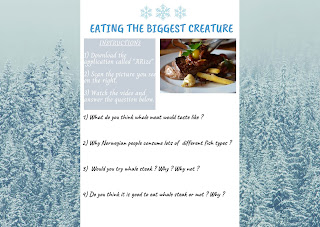
First we started our project by creating our groups. My workmate was Aslı (You can find her blog below.) We had 2 options to choose and we decided to choose option 1 which is exploring a city abroad. We wanted to introduce Norway and used application called ARize for this. I highly recommend ARize. It’s very simple to use and if you have any problems customer service is helping you 7/24. To be honest , at first creating your own augmented reality seemed really hard but after getting used to the styles/ programs and websites , it became easier. One of the difficulties we had was about youtube videos. Because of the privacy , it was very hard to use youtube video links. We solved the problem by downloading the video. Beside the difficulties , it was really awesome task , pretty funny and creative , very useful especially for language teachers as well.
You can find the link to our project , a video which we showed how the system works and Aslı’s blog below.
Today’s post will be about something really interesting. I enjoyed every minute while preparing it and I hope you will all like and use it !
I was assigned to create a teaching material integrating augmented reality. Basically Augmented reality (AR) refers to a simple combination of real and virtual (computer-generated) worlds. One of the most popular game which is called “Pokemon” is one of the examples of AR.
First we started our project by creating our groups. My workmate was Aslı (You can find her blog below.) We had 2 options to choose and we decided to choose option 1 which is exploring a city abroad. We wanted to introduce Norway and used application called ARize for this. I highly recommend ARize. It’s very simple to use and if you have any problems customer service is helping you 7/24. To be honest , at first creating your own augmented reality seemed really hard but after getting used to the styles/ programs and websites , it became easier. One of the difficulties we had was about youtube videos. Because of the privacy , it was very hard to use youtube video links. We solved the problem by downloading the video. Beside the difficulties , it was really awesome task , pretty funny and creative , very useful especially for language teachers as well.
You can find the link to our project , a video which we showed how the system works and Aslı’s blog below.
Aslı's blog : https://aslibostan1.wixsite.com/serendipity
Project : https://www.canva.com/design/DAD5FfC_izk/7RbroSTEAViURxXMr9HgRg/edit
(I am adding the project's pictures , just in case if you cannot open the link )



(I am adding the project's pictures , just in case if you cannot open the link )


Thanks for reading :)
ZSA
ZSA
Thursday, April 2, 2020
HELLO EVERYONE !
Today's post is about a corpus task. Corpus (plural corpara) is a collection of written texts, especially the entire works of a particular author or a body of writing on a particular subject. I wanted to design a worksheet about count and non-count nouns via Canva. Because it's an important topic and most of the students get confused on this topic. I wanted my students discover the topic so I gave them 3 different exercise types.
Here you can find my project as a picture :

Thanks for reading :)
ZSA
HELLO EVERYONE !
This is the post for saying that I am back ! After a break, I will start sharing my posts again about language education, technologies and material design. Most of the time I will use my blog for my "Material Design in ELT" course. This course is basically about creating a good design with the innovation and possibility of technology and science and how to integrate it to ELT classrooms. I am so keen ! Hope to see you guys very soon !
This is the post for saying that I am back ! After a break, I will start sharing my posts again about language education, technologies and material design. Most of the time I will use my blog for my "Material Design in ELT" course. This course is basically about creating a good design with the innovation and possibility of technology and science and how to integrate it to ELT classrooms. I am so keen ! Hope to see you guys very soon !
Thanks for reading :)
ZSA
Monday, January 6, 2020
SAYING GOODBYE !
HELLO EVERYONE !
It’s my final post ! It doesn’t mean that I will stop using
my blog , I will still continue to share personal and educational posts but
this is my last post for my educational technology class.
Although my generation is intertwined with technology, I wasn’t
using it very well or let’s say I wasn’t know how to use it efficiently. It was
really challenging for me because all of the things that we have done was new
for me. When a task given , maybe I searched more than my classmates. I tried
to understand what should I do and how to do it. But with this way I learnt a
lot. I discovered so many websites and applications with my teacher’s help
which I can use them in my future classes. Comparing myself to my initial state,
I realize how much I improved and it makes me happy !
I think when you want
to teach a new language , you can’t use traditional methods such as using
blackboard , eraser and chalk. You have
to use visual and auditory equipments. And you can do it via technological devices
easily. This course helped me to know which devices I can use and how can I use
them. Our teacher didn’t give us the tool directly but she gave us instructions
and led us. The reason why she did that is because the technological tools are
constantly changing. So it means that when we face with a new tool in the
future as a teacher , we’ll know how to discover the tools and integrate them to our classes.
My only suggestion for this course is doing more
presentations. We always prepared tasks, shared them on blog but couldn’t find
a chance to present it to the class. That would be great to show the product to
our friends.
I liked every task we did. My favourite work was “Creating An
Online Poster”. It was really fun and creative. What I liked least was “RSS” It
was little useless and boring for me. But mostly I loved every task which is
given ! Also It was good for me to work in pairs or groups.
- End of the Semester -
Thanks for reading :)
ZSA
Friday, December 27, 2019
AN INFOGRAPHIC ABOUT WEB 2.0 TOOLS
HELLO EVERYONE !
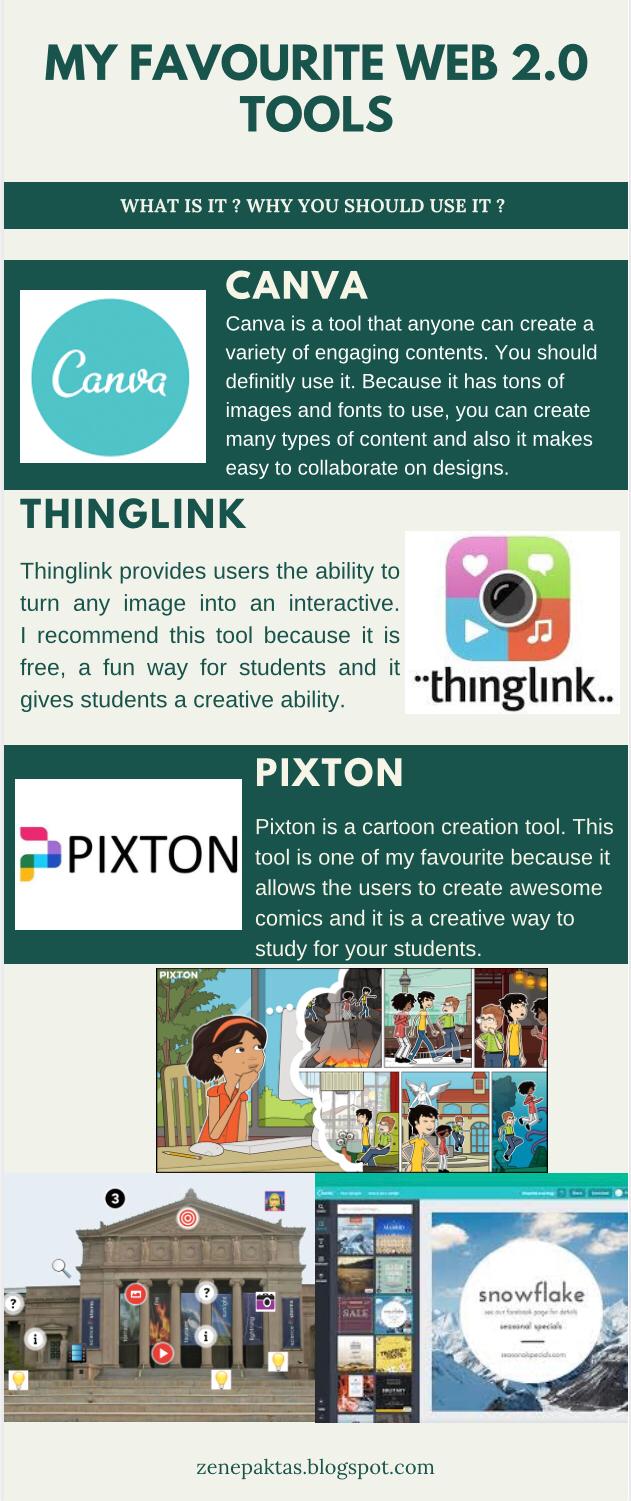
Today you will read a post about Web 2.0 tools and Infographic. I want to start with explaining what is web 2.0 tools. These tools are internet tools that the user is expected to interact and create content with others. Social media sites such as Facebook ,Twitter and Wikipedia are examples of Web 2.0 tools. Now I will share my 3 favourite tools with you.
Today you will read a post about Web 2.0 tools and Infographic. I want to start with explaining what is web 2.0 tools. These tools are internet tools that the user is expected to interact and create content with others. Social media sites such as Facebook ,Twitter and Wikipedia are examples of Web 2.0 tools. Now I will share my 3 favourite tools with you.
My first tool is "Canva " (https://www.canva.com/)
My second tool is "Thinglink " (https://www.thinglink.com/)
And my last tool is "Pixton" (https://app.pixton.com/#/edu)
You can see more details about these tools on my infographic below ! I used my first favourite tool Canva for create my infographic :)

(Here is a link for you if you want to go and check on canva )
So I hope that you like these tools and can use them easily !
Thanks for reading ! :)
ZSA
My second tool is "Thinglink " (https://www.thinglink.com/)
And my last tool is "Pixton" (https://app.pixton.com/#/edu)
You can see more details about these tools on my infographic below ! I used my first favourite tool Canva for create my infographic :)
(Here is a link for you if you want to go and check on canva )
So I hope that you like these tools and can use them easily !
Thanks for reading ! :)
ZSA
Wednesday, December 25, 2019
CREATING AN ONLINE POSTER
HELLO EVERYONE !
Today you will see a post about movie poster. Our task for this week was creating a movie poster based on the book we read. We imagined our book was being made into a movie and we were responsible for its advertising.
I used "spark adobe " to create my movie poster. Adobe Spark is an online and mobile design app.
Easily create stunning social graphichs, short videos, web pages, posters etc.It is Easy to learn and use. Find a large selection of backgrounds to choose from, templates. Have the chance to find various layouts and designs. Add texts with different fonts and colors. Save your product and keep it in your sp's library (You can find it in the left side of your page as a "Projects" section.)
Firstly , I started my project by choosing background pictures which are related to my book's content. Then I added author name as a director and my name as a producer. I wrote some quotes from the book and choose some actors/actress as if they act on my movie :)
Here is a link for my tool , Adobe Spark : https://spark.adobe.com
And you can find my creation below :

Thanks for reading ! :)
ZSA
Today you will see a post about movie poster. Our task for this week was creating a movie poster based on the book we read. We imagined our book was being made into a movie and we were responsible for its advertising.
I used "spark adobe " to create my movie poster. Adobe Spark is an online and mobile design app.
Easily create stunning social graphichs, short videos, web pages, posters etc.It is Easy to learn and use. Find a large selection of backgrounds to choose from, templates. Have the chance to find various layouts and designs. Add texts with different fonts and colors. Save your product and keep it in your sp's library (You can find it in the left side of your page as a "Projects" section.)
Here is a link for my tool , Adobe Spark : https://spark.adobe.com
And you can find my creation below :

Thanks for reading ! :)
ZSA
Tuesday, December 24, 2019
DIGITAL STORYTELLING PROJECTS
HELLO EVERYONE !
Today you will read a post about DIGITAL STORYTELLING
PROJECTS. First I want to start with "What is digital storytelling ?
" So basically Digital storytelling describes a simple, creative process
through which people with little or no experience in computer film-making gain
skills needed to tell a person story as two-minute film using predominantly
still images and vioceover.
I worked with one of my friend (Elif Bostan ). First we
choose our topic and did some research about that topic. We wrote a
script. We found some videos and pictures which can help us to convey our
message to the audiences. We made a production , film it and then edited it.
Our topic was animal cruelty in the world (especially in Turkey) This topic is one of the major problems and the one who always make me sad about it :( I hope we can bring your attention and can reach a lot people !
And also you can find Elif's blog by clicking here : https://itselifbostan.blogspot.com/
Thanks for reading :)
ZSA
Tuesday, December 3, 2019
INTERNET- BASED PROJECT
HELLO EVERYONE !
Today you will be seeing my first work on padlet. Padlet is an application to create an online bulletin board that you can use to display information for any topic.
In this tas, we started with creating our own groups. In my group, I worked with three of my friends and we chose "Animal Violence/Cruelty" as our topic which I am really sorry and nervous about it. We created our wall by clicking "Add a new wall ". After we decided background and title etc. we started to work individually. I wrote 2 line for "What I Know " column. I wrote 3 question for "What I Want To Know " column and I searched about these topics : What is animal cruelty/violence ? , What you can do about this issue ? , Why do people treat animals cruelly ?
I think this was the best project that I created. I liked Padlet a lot. It is very useful,beneficial website and easy to learn how to use it. You can use different outlooks, you can add videos,pictures or links.
PS : I worked with Elif Boran,Elif Bostan,Şeyma Nur Altan. Thanks for their contribution !
Here is our Padlet work : https://padlet.com/zeyzey24525/upz7a7tjrxne
Today you will be seeing my first work on padlet. Padlet is an application to create an online bulletin board that you can use to display information for any topic.
In this tas, we started with creating our own groups. In my group, I worked with three of my friends and we chose "Animal Violence/Cruelty" as our topic which I am really sorry and nervous about it. We created our wall by clicking "Add a new wall ". After we decided background and title etc. we started to work individually. I wrote 2 line for "What I Know " column. I wrote 3 question for "What I Want To Know " column and I searched about these topics : What is animal cruelty/violence ? , What you can do about this issue ? , Why do people treat animals cruelly ?
I think this was the best project that I created. I liked Padlet a lot. It is very useful,beneficial website and easy to learn how to use it. You can use different outlooks, you can add videos,pictures or links.
PS : I worked with Elif Boran,Elif Bostan,Şeyma Nur Altan. Thanks for their contribution !
Here is our Padlet work : https://padlet.com/zeyzey24525/upz7a7tjrxne

ZSA
Tuesday, November 26, 2019
FILM REVIEW

HELLO EVERYONE !
This is my first film review. It was a task for my educational technologies lesson.Our teacher created a wiki page where we can add our film reviews. Me and my friend Gizem , collaboratively wrote our ideas about the movie which is called "Hachiko : A Dog's Tale ". The movie is about a heartbreaking relationship between a dog and his owner. It's so emotional. Also it affected me a lot because it's a real story. I highly recommend it. It is one of my favourite movies.
Here is the link for you :
http://ourfilmreviews.pbworks.com/w/page/137087352/Hachiko%3A%20A%20Dog's%20Story
Also you can check my pair's blog,Gizem Can :
https://gizemcann.wixsite.com/website
Thanks for reading :)
ZSA
Monday, November 18, 2019
THE WORLD IS MINE !
HELLO EVERYONE !
This is my podcast post !
It is a really creative way for learning new ideas. I love listening podcast but for the first time in my life I prepared one :) It was challenging because I don't know how to use it or create it. But it was great/ enjoyable at the same time. I absolutely want to use podcasting in my future classes. It is useful for long time travellers like me in public transportations ! :) We can listen and learn while on the way. I highly recommend this to all
Here is my podcast : https://zeyzey24525.podomatic.com/

Thanks for reading and listening :)
ZSA
Wednesday, November 6, 2019
RSS
HELLO EVERYONE !
It's Zeynep again :)Today I am going to share a post about "RSS"
RSS is a simple method that can help you to follow your favorite newcasts,blogs,websites and social media channels. Instead of visiting sites to find new posts or subscribing to sites to receive notification of new posts, you can find the RSS feed on a website and read new posts in an RSS reader.
There are a lot you can do wirh RSS. For instance :
-Follow discussions on web pages and in forums without visiting each page to read the list of posted comments.
-You can make your favorite blogger's tasty food and share recipes with your friends.
-Stay current with local,national and international news from several sources.
I use RSS FEED READER ONLINE. I really like this thing because rather than visiting every website/blogs, I can see the news on one page. It makes things really easy. Another good thing about RSS is you can discover new blogs. Depending on what type of content you are following, there is an option for you. You can click the science/gaming/news etc and there are lots of links that you can interest and follow.
I also like this because there are lots of different ways to get notifications( certain apps, mobile phone or e-mail notifications) With this feature, I can get informed very quickly.
Here is my RSS FEED READER :

It's Zeynep again :)Today I am going to share a post about "RSS"
RSS is a simple method that can help you to follow your favorite newcasts,blogs,websites and social media channels. Instead of visiting sites to find new posts or subscribing to sites to receive notification of new posts, you can find the RSS feed on a website and read new posts in an RSS reader.
There are a lot you can do wirh RSS. For instance :
-Follow discussions on web pages and in forums without visiting each page to read the list of posted comments.
-You can make your favorite blogger's tasty food and share recipes with your friends.
-Stay current with local,national and international news from several sources.
I use RSS FEED READER ONLINE. I really like this thing because rather than visiting every website/blogs, I can see the news on one page. It makes things really easy. Another good thing about RSS is you can discover new blogs. Depending on what type of content you are following, there is an option for you. You can click the science/gaming/news etc and there are lots of links that you can interest and follow.
I also like this because there are lots of different ways to get notifications( certain apps, mobile phone or e-mail notifications) With this feature, I can get informed very quickly.
Here is my RSS FEED READER :

For now, I am only following 10 websites. There are sites about
science,new channels,travel etc. My favourite is National Geographic News. I
follow NGN on other platforms but it is the best way for me to see the news in
an order and in an quick way on RSS. I can learn so much thing on NGN (about
the World,new comings etc) I think teachers should follow NGN because they can
learn about animals,self improvement or any other topic. Also they can improve
their English.
Thanks for reading J
ZSA
ZSA
Tuesday, October 29, 2019
21st CENTURY LEARNING
HELLO EVERYONE !
Thanks for reading :)
ZSA
Twenty-first-century learning is simply an effort to define
modern learning by using modern tools. Actually, the contexts are not so
different from the past but the way we teach, the things we use is different.
For example, we teach chemistry as how it is in the past (of course with some
changes ) but we use smartboards, not blackboards. Virtual tools like
smartboards, projectors, computers create borderless learning territories for
students of all ages, anytime and anywhere. So I can say that keyword for the 21st
century learning is technology for me. It allows for 24/7 access to
information, constant social interaction, and easily created and shared digital
content.
Beside this , twenty-first-century learning means that
students produce, think critically and they evaluate informations that given.
Students are active while the teacher is passive in the lessons.
Basically , 21st Century skills are Critical thinking,Creativity,Collaboration,Communication,
Information literacy,Media literacy,Technology literacy,Flexibility,Leadership,Initiative,Productivity,
Social skills. Without these skills, students are left to memorize facts,
recall details for worksheets.
PS : I used these words and created Word cloud. Here is my word cloud :


https://www.edweek.org/tsb/articles/2010/10/12/01panel.h04.html https://www.aeseducation.com/career-readiness/what-are-21st-century-skills
Thanks for reading :)
ZSA
WELCOME
HELLO EVERYONE !
It's Zeynep :) This is my first blog post. I wanted to say welcome to everybody who visit my website. This is the platform where I am going to share my adverntures, memories, pictures and some educational things. Hope you enjoy it !
 Thanks for reading :)
ZSA
It's Zeynep :) This is my first blog post. I wanted to say welcome to everybody who visit my website. This is the platform where I am going to share my adverntures, memories, pictures and some educational things. Hope you enjoy it !

ZSA
Subscribe to:
Posts (Atom)